利用js实现产品筛选功能案例
<style >
.custom-collection-products{position: relative;}
.lxtype{position: absolute;right: 0;width: 25%;z-index: 2;background: #fff;}
.lxtype-t{display: flex;justify-content: space-between;padding: 3% 9%;border: 1px solid #d0c5c5;border-radius: 50px;}
.lxtype-t .cfjt{display: flex;align-items: center;color: #000;width: 10px;}
.lxtype-t .cfjt.active{transform: rotate(180deg);}
.wj-list{display: flex;}
.wj-list div img{width: 100%;height: 100%;}
.wj-list div:nth-of-type(1){width: 35%;}
.wj-list div:nth-of-type(2){margin-left: 2%;display: flex;align-items: center;width: 65%;}
.lxtype-box{box-shadow: rgba(0, 0, 0, .1) 0 0 15px;padding: 1% 9%;margin-top: 2rem; display: none;}
.lxtype-list{display: flex;align-items: center;justify-content: space-between;padding: 3% 0 1%;}
.lxtype-list div{width: 16px;height: 16px; border: 1px solid #eb6100; border-radius: 100%;display: flex;justify-content: center;align-items: center;}
.lxtype-list div span{width: 8px;height: 8px;border-radius: 100%;background:#eb6100;display:none;}
.lxtype-list:hover,.lxtype-t:hover{cursor:pointer;}
.lxtype-list.active{color:#eb6100;}
.lxtype-list.active div span{display: block;}
.lxtype-contant {
display: none;
}
.lxtype-contant.active {
display: block;
order: -1;
}
.lxtype-contant-container {
display: flex;
flex-direction: column;
}
.lxtype-box.active {
display: block;
}
.zong-lxtype-contant.gbactive{display: none!important;}
.lxtype-contant-wrap{
display: flex;
flex-direction: column;
}
</style>
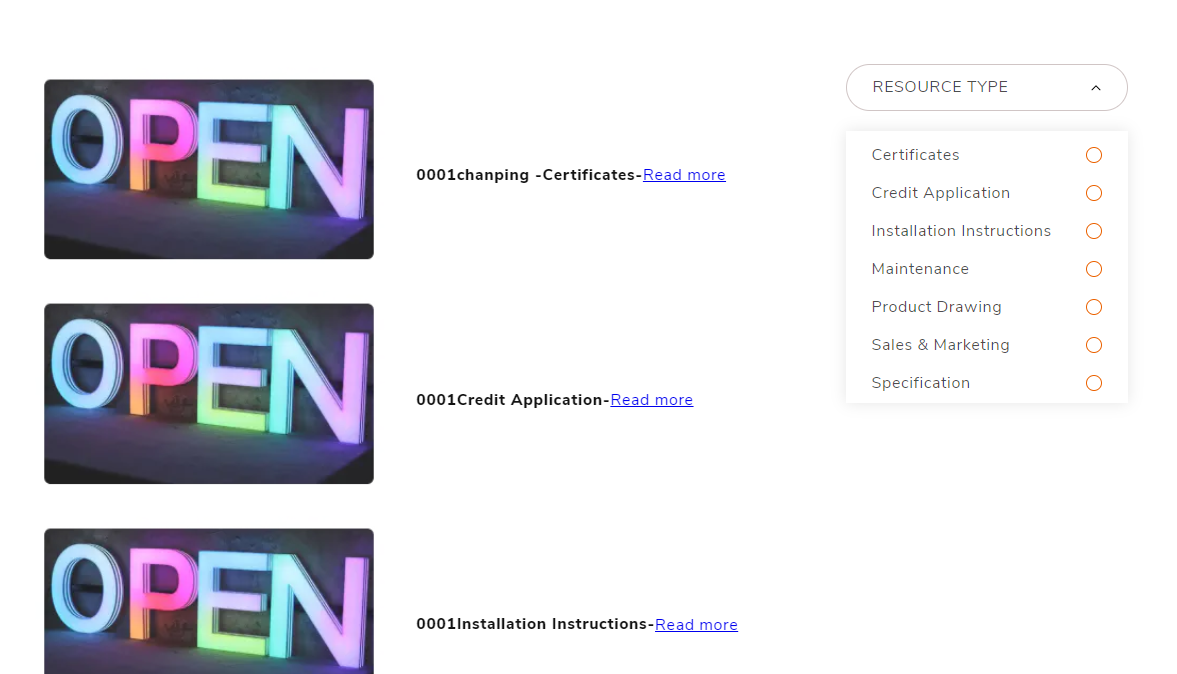
<div class="lxtype-warp">
<div class="lxtype">
<div class="lxtype-t">
<span>RESOURCE TYPE</span>
<span class="cfjt"><svg aria-hidden="true" focusable="false" class="icon icon-caret" viewBox="0 0 10 6">
<path fill-rule="evenodd" clip-rule="evenodd" d="M9.354.646a.5.5 0 00-.708 0L5 4.293 1.354.646a.5.5 0 00-.708.708l4 4a.5.5 0 00.708 0l4-4a.5.5 0 000-.708z" fill="currentColor"></path>
</svg></span>
</div>
<div class="lxtype-box">
<div class="lxtype-list">Certificates <div><span></span></div></div>
<div class="lxtype-list">Credit Application <div><span></span></div></div>
<div class="lxtype-list">Installation Instructions <div><span></span></div></div>
<div class="lxtype-list">Maintenance <div><span></span></div></div>
<div class="lxtype-list">Product Drawing <div><span></span></div></div>
<div class="lxtype-list">Sales & Marketing <div><span></span></div></div>
<div class="lxtype-list">Specification <div><span></span></div></div>
</div>
</div>
<div class="lxtype-contant-wrap">
<div class="lxtype-contant">
<div class="wj-list">
<div><img src="{{ article.image | img_url: 'master' }}" alt="Certificates01pp"></div>
<div>
<h5>Certificates01</h5>
<a href="{{ article.url }}">Read more</a>
</div>
</div>
</div>
<div class="lxtype-contant"> Credit Application内容</div>
<div class="lxtype-contant"> Installation Instructions内容</div>
<div class="lxtype-contant"> Maintenance内容</div>
<div class="lxtype-contant"> Product Drawing内容</div>
<div class="lxtype-contant"> Sales & Marketing内容</div>
<div class="lxtype-contant"> Specification内容</div>
</div>
</div>
判断一
如果点击.lxtype-warp .lxtype .lxtype-box .lxtype-list时,当前的.lxtype-list加个active的class类,相应.lxtype-warp .lxtype-contant是加个active的class类 显示的;始时所有.lxtype-warp .lxtype-contant没有加到active的class类就隐藏。
每当再点击其他.lxtype-warp .lxtype .lxtype-box .lxtype-list时,当前的.lxtype-list加个active的class类, 相应.lxtype-warp .lxtype-contant也是加个active的class类 显示的, 此时优先显示在第一排,始时所有.lxtype-warp .lxtype-contant没有加到active的class类就隐藏。
如果当前.lxtype-warp .lxtype .lxtype-box .lxtype-list第二次点击时,和相应.lxtype-warp .lxtype-contant都去掉active,
如果当前.lxtype-warp .lxtype .lxtype-box .lxtype-list第三次点击时,当前的.lxtype-list又加个active的class类, 相应.lxtype-warp .lxtype-contant又加个active的class类 显示的, 此时再优先显示在第一排,始时所有.lxtype-warp .lxtype-contant没有加到active的class类就隐藏。
此次类推
如果当所有.lxtype-warp .lxtype .lxtype-box .lxtype-list点击时, 所有.lxtype-list都去掉active的class类状态时;
所有.lxtype-warp .lxtype-contant都去掉active的class类状态时,
始时所有.lxtype-warp .lxtype-contant就回到页面进入时 lxtype-contant-wrap里面所有 lxtype-contant那样排列显示的为 一开始状态:
<script >
document.addEventListener('DOMContentLoaded', () => {
const lists = document.querySelectorAll('.lxtype-list');
const contents = document.querySelectorAll('.lxtype-contant');
let clickCounts = Array(lists.length).fill(0);
let initialOrder = Array.from(contents); // 初始状态的内容顺序
// 初始化,所有 .lxtype-contant 显示
contents.forEach(content => content.style.display = 'block');
function updateDisplay() {
let anyActive = false;
contents.forEach((content, index) => {
if (lists[index].classList.contains('active')) {
content.style.display = 'block';
anyActive = true;
} else {
content.style.display = 'none';
}
});
if (!anyActive) {
contents.forEach(content => content.style.display = 'block');
}
}
lists.forEach((list, index) => {
list.addEventListener('click', () => {
clickCounts[index]++;
if (clickCounts[index] % 2 === 1) { // 奇数次点击
list.classList.add('active');
contents[index].classList.add('active');
// 优先显示在第一排
document.querySelector('.lxtype-contant-wrap').insertBefore(contents[index], document.querySelector('.lxtype-contant-wrap').firstChild);
} else { // 偶数次点击
list.classList.remove('active');
contents[index].classList.remove('active');
}
const allInactive = Array.from(lists).every(item => !item.classList.contains('active'));
if (allInactive) {
// 回到初始状态
initialOrder.forEach(content => document.querySelector('.lxtype-contant-wrap').appendChild(content));
contents.forEach(content => content.style.display = 'block');
clickCounts = Array(lists.length).fill(0); // 重置点击次数
} else {
updateDisplay();
}
});
});
updateDisplay();
});
const toggleButton = document.querySelector('.lxtype-t');
const cfjt = document.querySelector('.cfjt');
const box = document.querySelector('.lxtype-box');
// 当点击lxtype-t时 lxtype-box就显示
toggleButton.addEventListener('click', () => {
cfjt.classList.toggle('active');
box.classList.toggle('active');
});
</script>
